In specialty insurance, every submission gets a first read before an underwriter spends real time on it: who is the insured, what is being asked for, is it complete, is it anywhere near appetite. It is skilled, repetitive work, and the answer usually goes back to the broker as an email. This example follows a made-up underwriting team turning that first read into an InsightWorker app.
Fernwood Specialty's property desk
Fernwood Specialty (a fictional MGA) writes commercial property through about forty brokers. Two underwriting assistants triage incoming submissions for four underwriters. A complete triage takes them twenty to forty minutes, much of it re-keying the same fields from PDFs and spreadsheets and checking the same appetite guide. Priya, the desk's underwriting manager, wants the first read to take minutes and to look the same whoever does it.
The app
The form
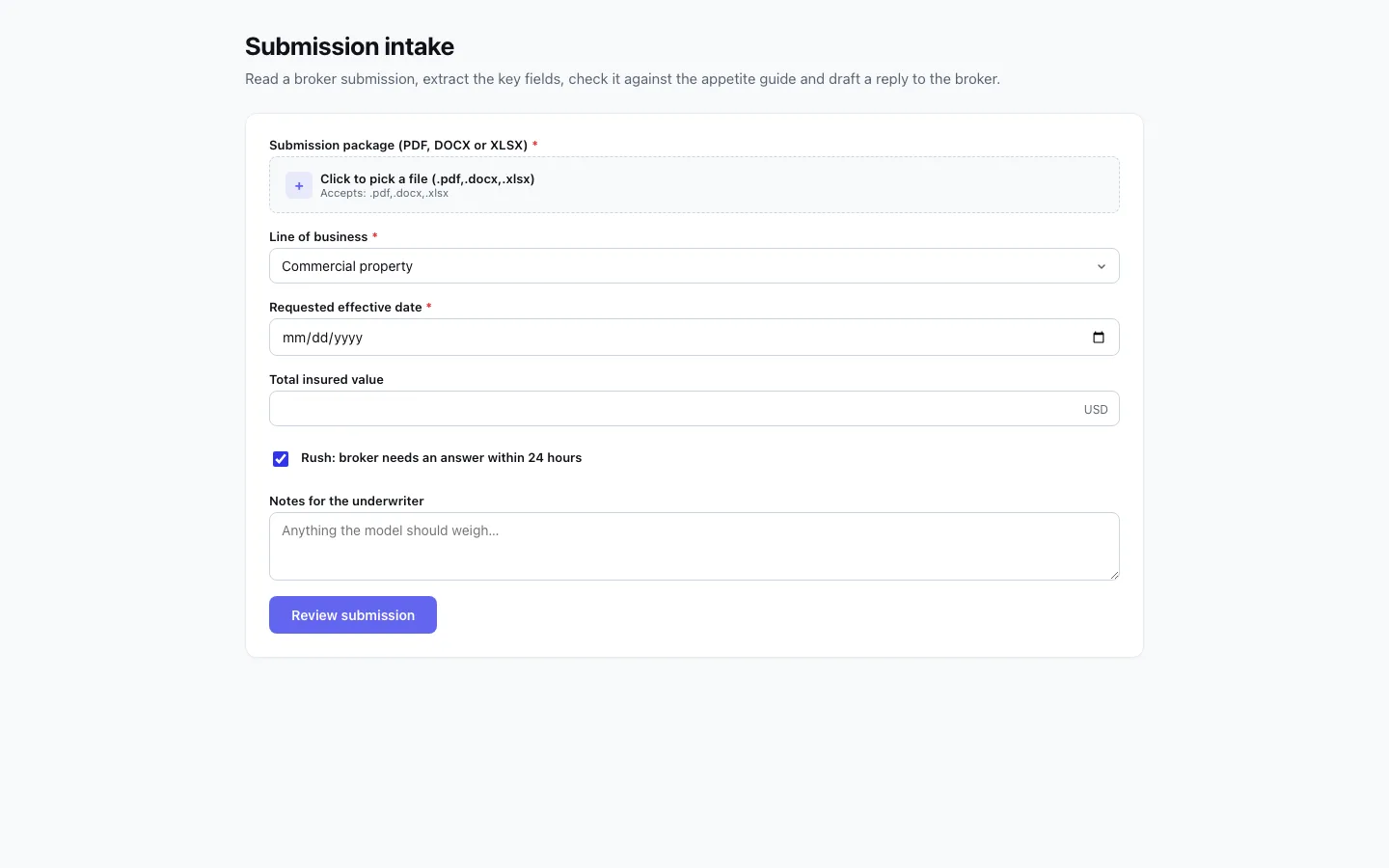
The assistants want one screen: drop in the submission package, pick the line of business, set the requested effective date and the
total insured value, and tick Rush when the broker needs an answer within a day, which reveals a notes field for the underwriter.
That is six inputs in widget.json: a file, a select, a date, a number with a USD unit, a checkbox and a textarea with
visible_if.
Three steps, two kinds
- extracted is a prompt step. The model reads the package and returns the fields as JSON, shown as a key/value card.
The step's prompt, and
plan.md, say what to do when a field is missing: leave it empty and say so, never guess. - appetite_checks is a shell step. The appetite guide's hard rules (occupancy classes the desk writes, a TIV ceiling, states it does not write, a minimum years in business) live in a small script that reads the extracted fields and returns a table of checks with pass, fail or unknown. No model decides appetite.
- broker_reply is a prompt step that drafts a short email from the two outputs above, in an editable panel with copy and download actions.
The plan
plan.md holds what an experienced assistant would tell a new one: which documents in a typical package matter (the
application, the statement of values, five years of loss runs), how to treat a statement of values in a spreadsheet, the desk's tone with
brokers, and that the reply must list missing items before anything else.
How the desk uses it
- The assistant opens the app in a browser (the worker's web mode on a shared server) and fills the form.
- The extracted fields appear first. The assistant corrects anything wrong before reading further: the rest depends on them.
- The appetite table shows each rule with its result. Any fail or unknown is explained in the draft.
- The underwriter edits the draft and sends it from their own mailbox. The app does not send anything.
What changed, and what did not
The assistants still read every submission; they no longer re-key it. Appetite decisions come from the same rules every time, and when the guide changes, the script changes in one place with a review. The draft gives the underwriter a starting point in the desk's voice, and the underwriter remains the one who decides and signs.
Building your own
- Write down the first-read checklist your best assistant uses; that becomes
plan.md. - Separate rules from judgement: rules go in a script (a shell step), judgement in prompts.
- Start with one line of business and one output; add panels when people ask for them.
- Keep the human send: the app drafts, people decide.
Related: the anatomy of an app.